Query Processing
When a user applies filters in a search interface, the request flows through four main components:
- UI Components translate user interactions into SQON (Serializable Query Object Notation) filters
- GraphQL serves as the communication layer, combining SQON filters with field selections, pagination, and sorting parameters
- Arranger Server translates the GraphQL query into an Elasticsearch query
- Elasticsearch executes the query and returns results, which flow back through Arranger to the client
This pipeline separates client-side applications from backend Elasticsearch servers.
SQON (Serializable Query Object Notation) is Overture's filter language for communicating queries between system components. The examples below show SQONs in action, followed by detailed explanations of what SQON is, why it exists. For a deeper reference on how to build them using operators, aliases, pivots, and covering common edge cases, see SQON in detail.
The Processing Flow
The following example demonstrates the query processing pipeline:
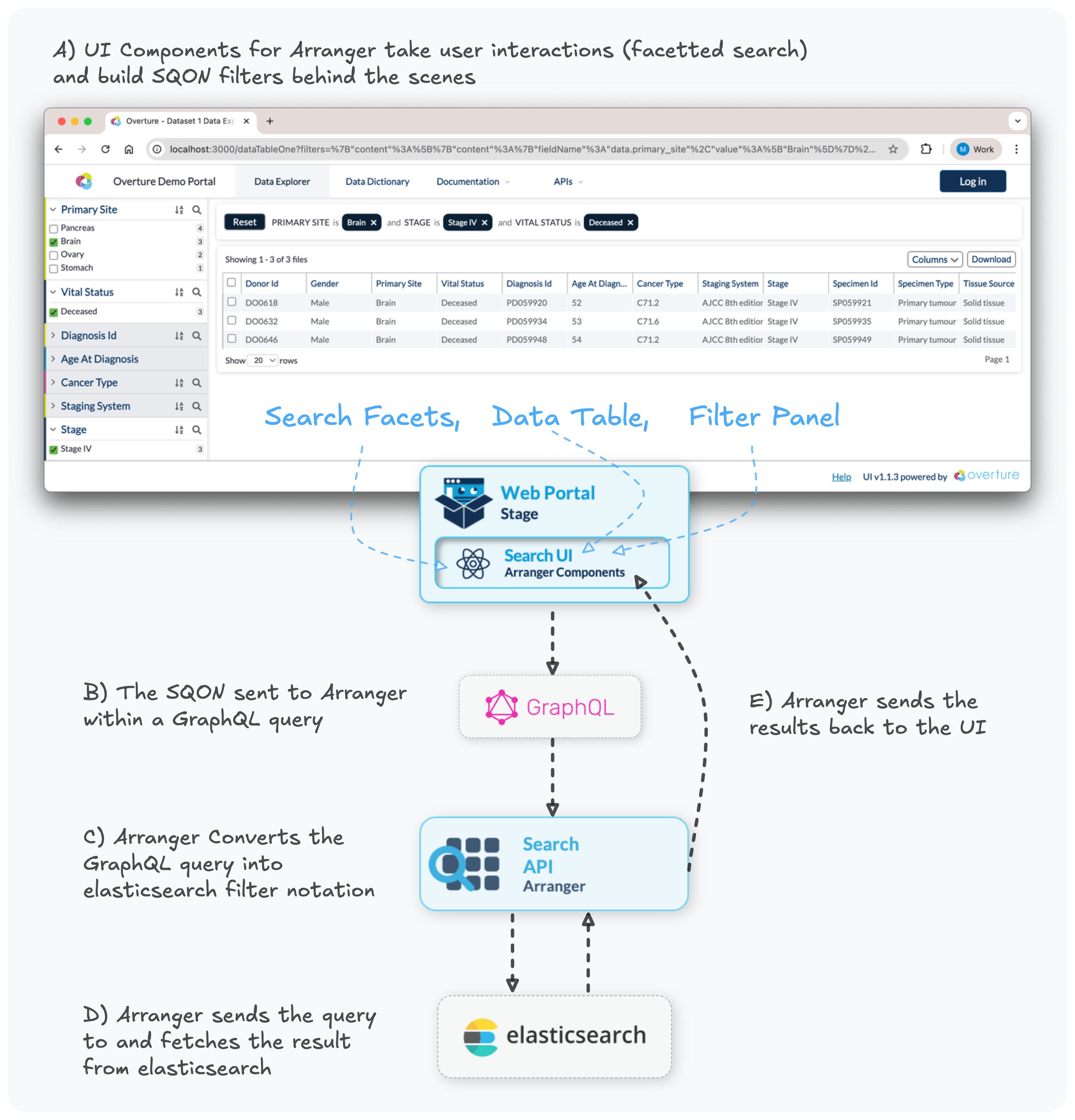
A) View the SQON generated by the UI
{
	"op": "and",
	"content": [
		{
			"op": "in",
			"content": {
				"fieldName": "data.primary_site",
				"value": ["Brain"]
			}
		},
		{
			"op": "in",
			"content": {
				"fieldName": "data.stage",
				"value": ["Stage IV"]
			}
		},
		{
			"op": "in",
			"content": {
				"fieldName": "data.vital_status",
				"value": ["Deceased"]
			}
		}
	]
}
This SQON filters for records where:
- Primary site is "Brain" AND
- Stage is "Stage IV" AND
- Vital status is "Deceased"
The client sends the SQON to Arranger as part of a GraphQL request:
B) View the GraphQL query with embedded SQON
{
  "query": "query tableData($sqon: JSON, ...) {
    file { // Arranger's "document type"
      hits(filters: $sqon, ...) { ... }
    }
  }",
  "variables": {
    "sqon": {
      "op": "and",
      "content": [
        {
          "op": "in",
          "content": {
            "fieldName": "data.primary_site",
            "value": ["Brain"]
          }
        },
        {
          "op": "in",
          "content": {
            "fieldName": "data.stage",
            "value": ["Stage IV"]
          }
        },
        {
          "op": "in",
          "content": {
            "fieldName": "data.vital_status",
            "value": ["Deceased"]
          }
        }
      ]
    },
    "first": 20,
    "offset": 0,
    "sort": []
  }
}
Key Components:
- SQON Filter (lines 4-29): The filter logic passed as a query variable
filters: $sqon(line 2): The GraphQL query parameter that receives the filter- Pagination (lines 24-25):
firstandoffsetcontrol how many records to fetch and where to start - Sorting (line 26): Order of results (empty in this example)
Arranger receives the GraphQL request and translates the entire query, including the embedded SQON filter, into a native Elasticsearch query:
C) View the resulting Elasticsearch query
{
	"query": {
		"bool": {
			"must": [
				{
					"terms": {
						"data.primary_site": ["Brain"]
					}
				},
				{
					"terms": {
						"data.stage": ["Stage IV"]
					}
				},
				{
					"terms": {
						"data.vital_status": ["Deceased"]
					}
				}
			]
		}
	},
	"from": 0,
	"size": 20,
	"sort": []
}
Translation Breakdown:
| SQON Component | Elasticsearch Equivalent | Notes |
|---|---|---|
"op": "and" | "bool": { "must": [...] } | AND logic requires all conditions to match |
"op": "in" | "terms": { "field": [...] } | IN operation uses Elasticsearch's terms query |
"fieldName": "data.primary_site" | "data.primary_site": [...] | Field name maps directly to the index mapping |
"first": 20 | "size": 20 | Pagination size parameter |
"offset": 0 | "from": 0 | Pagination offset parameter |
This translation happens automatically ensuring users never need to interact directly with Elasticsearch.
SQON At A Glance
SQON (pronounced like "scone") is Overture's JSON-based filter syntax.
At a high level:
- a SQON is made of operations
- those operations can be leaf filters or boolean groups
- in Arranger, the SQON is sent as part of a GraphQL request
- which in turn is translated into an Elasticsearch query
Here is a small example:
{
	"op": "and",
	"content": [
		{
			"op": "in",
			"content": {
				"fieldName": "province",
				"value": ["Ontario"]
			}
		},
		{
			"op": "gte",
			"content": {
				"fieldName": "age",
				"value": 18
			}
		}
	]
}
This means:
- province is Ontario
- and age is at least 18
Why SQON exists:
SQON solves a fundamental challenge in data applications: how to define and communicate filters between different parts of a system. Traditional approaches use flat lists of filters, which are simple but limited. SQON provides a more powerful solution by supporting nested boolean logic (combining AND, OR, and NOT operations) while remaining easy to work with.
- Serialization: SQONs can be stored, transmitted, or encoded into URLs
- Nested boolean logic: SQONs can express combinations that flat filters cannot
- Separation of concerns: clients define filters once, while Arranger handles backend-specific query translation
If you want the full SQON reference, including operators, aliases, pivot behavior, accepted value shapes, and edge cases, continue to SQONs in detail.
If you encounter any issues or have questions, please don't hesitate to reach out through our relevant community support channels.