Metadata Retrieval
Query & retrieval of metadata (Analyses) from Song.
Using Swagger UI
Swagger UI is ideal for exploration and simple use cases. It provides detailed descriptions of all available endpoints, expected inputs, and error responses.
-
Locate your endpoint of interest: Use any
GETendpoint to retrieve data from Song. For example, under the Analysis dropdown, find theGETGetAnalysesForStudy endpoint.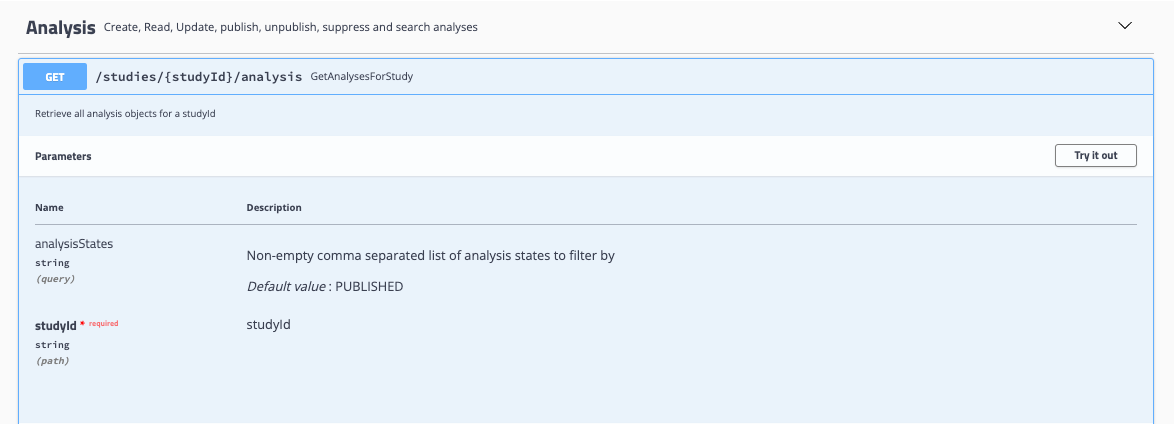
-
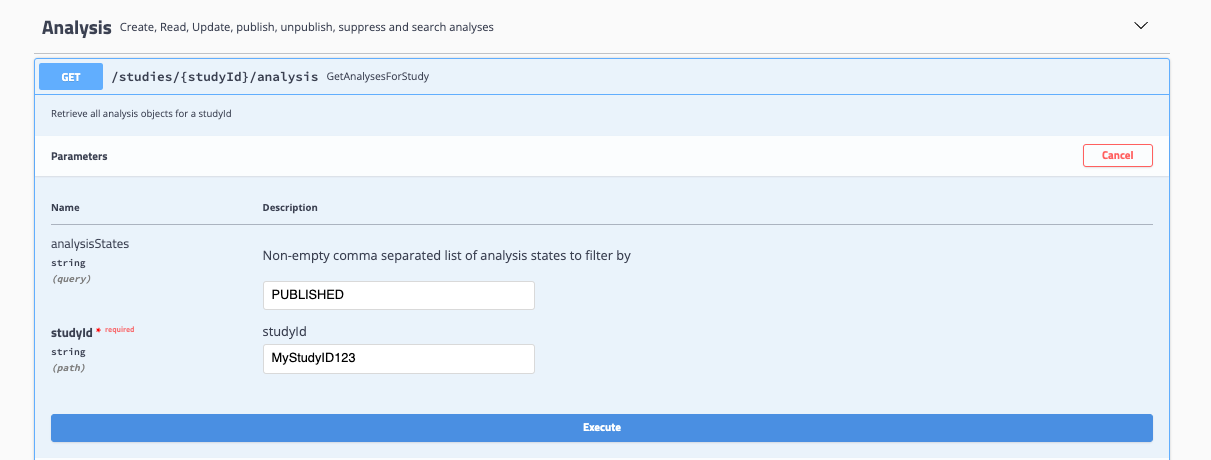
Select Try it out and input your desired values: For GetAnalysesForStudy, input a studyID and analysis state to return all associated analyses.
-
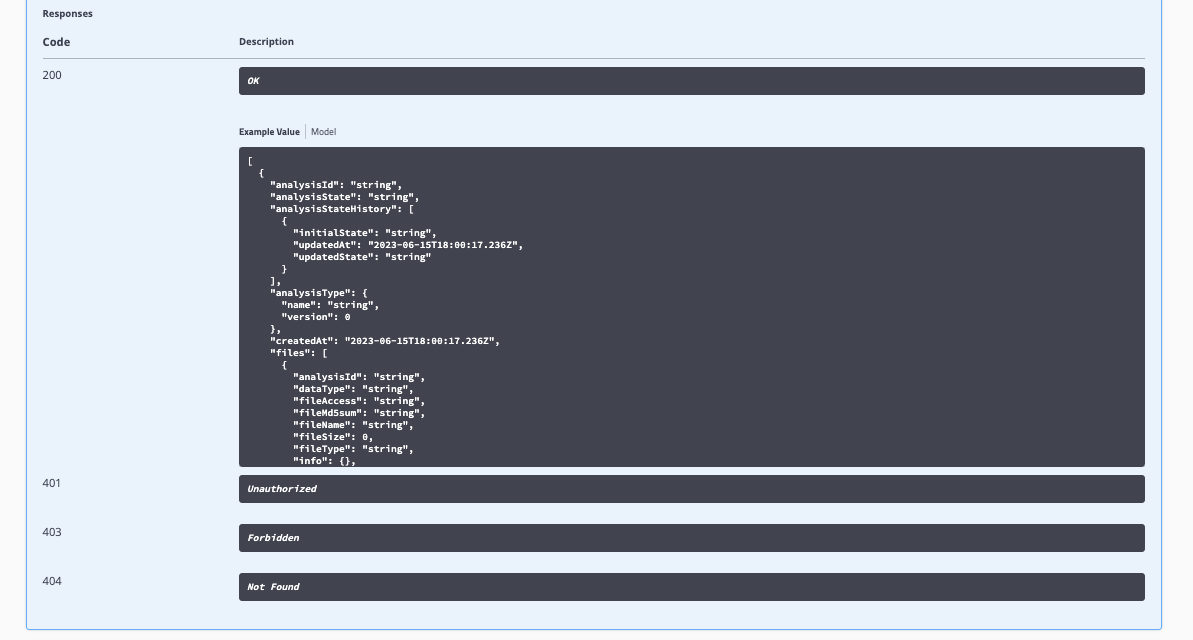
Select Execute: Expected responses, response codes, and descriptions are documented within Swagger-UI.
Programmatic Queries
Here are examples of how to retrieve analyses using the Song API programmatically.
Example 1: Retrieve a Single Analysis by ID
When you already know an analysis's ID, retrieve it directly with the GetAnalysis endpoint:
import requests

url = "https://<YOUR-SONG-URL>"
study = "ABC123"
analysis_id = "ANALYSIS-ABC123-SAMPLEA"

endpoint = f"{url}/studies/{study}/analysis/{analysis_id}"
response = requests.get(endpoint)
print(response.json())
To locate analyses by a submitter field (such as a sample or donor ID) rather than by analysis ID, see Example 2: Song has no server-side search for those fields, so you retrieve the study's analyses and filter them client-side.
For technical support or specific use cases, please don't hesitate to reach out through our support page or our discussion forum.
Example 2: Bulk Analysis Query
This is the pattern for finding analyses by a submitter field (here, a submitter sample ID). Song has no server-side search for donor, specimen, or sample IDs (they are custom-schema fields in the analysis payload, not base-schema entities), so you retrieve the study's published analyses in bulk and filter them client-side:
import requests
import pandas as pd

# Declare buckets to house analyses
aggregated_analyses = []
filtered_analyses = []

# Variables
study = "ABC123"
status = "PUBLISHED"
url = "https://<YOUR-SONG-URL>"

# Read CSV to identify specimens
tmp = pd.read_csv("path/to/consensus_seq_version.csv", sep=",")

# Clean up CSV
tmp.set_index('Specimen Collector Sample ID', inplace=True)
tmp['old'] = tmp["Consensus Sequence Software Version(old)"]
tmp['new'] = tmp["Consensus Sequence Software Version(new)"]
tmp.drop(["Consensus Sequence Software Version(old)", "Consensus Sequence Software Version(new)"], axis=1, inplace=True)

# First endpoint query
endpoint = f"{url}/studies/{study}/analysis/paginated?analysisStates={status}&limit=100&offset=0"
response = requests.get(endpoint)

# Check if query successful
if response.status_code != 200:
    print(f"Error: {response.status_code}, {endpoint}")
    exit(1)

# Get total analyses for pagination
total = response.json()['totalAnalyses']

# Append first set of analyses into bucket
aggregated_analyses.extend(response.json()['analyses'])

# Retrieve remaining pages of 100 queries and append to bucket
for offset in range(100, total, 100):
    endpoint = f"{url}/studies/{study}/analysis/paginated?analysisStates={status}&limit=100&offset={offset}"
    response = requests.get(endpoint)

    if offset % 1000 == 0:
        print(f"Retrieving {offset} out of {total} analyses")

    if response.status_code != 200:
        print(f"Error: {response.status_code}, {endpoint}")
        exit(1)

    aggregated_analyses.extend(response.json()['analyses'])

# Filter analyses by submitter sample ID.
# `samples[].submitterSampleId` is a custom-schema field here; adjust the path to match your schema.
print("Filtering analyses")
filtered_analyses = [analysis for analysis in aggregated_analyses
                     if analysis['samples'][0]['submitterSampleId'] in tmp.index.values]

print(f"Total analyses: {len(aggregated_analyses)}")
print(f"Filtered analyses: {len(filtered_analyses)}")
When making bulk calls, consider the time spent on API calls. For example, if you need to retrieve 800 out of 1000 analyses and only have submitter sample IDs, it's more efficient to make bulk calls of 100 analyses (totaling 10 API calls) and then filter for the desired submitter sample IDs, rather than making 800 individual API calls.